SELECT, INSERT, UPDATE, DELETE
Details:
This lab will build your experience using SQL combined with PHP.
You will create a basic default page that has 4 links on it. The first link
goes to the select page, the second to the insert page, the third to the update page, and the
fourth to the delete page. The select page uses a SQL SELECT to list some information
from both the Employees and Shippers database tables in a table formatted page with headers. The select page
should have a link back to the default page.
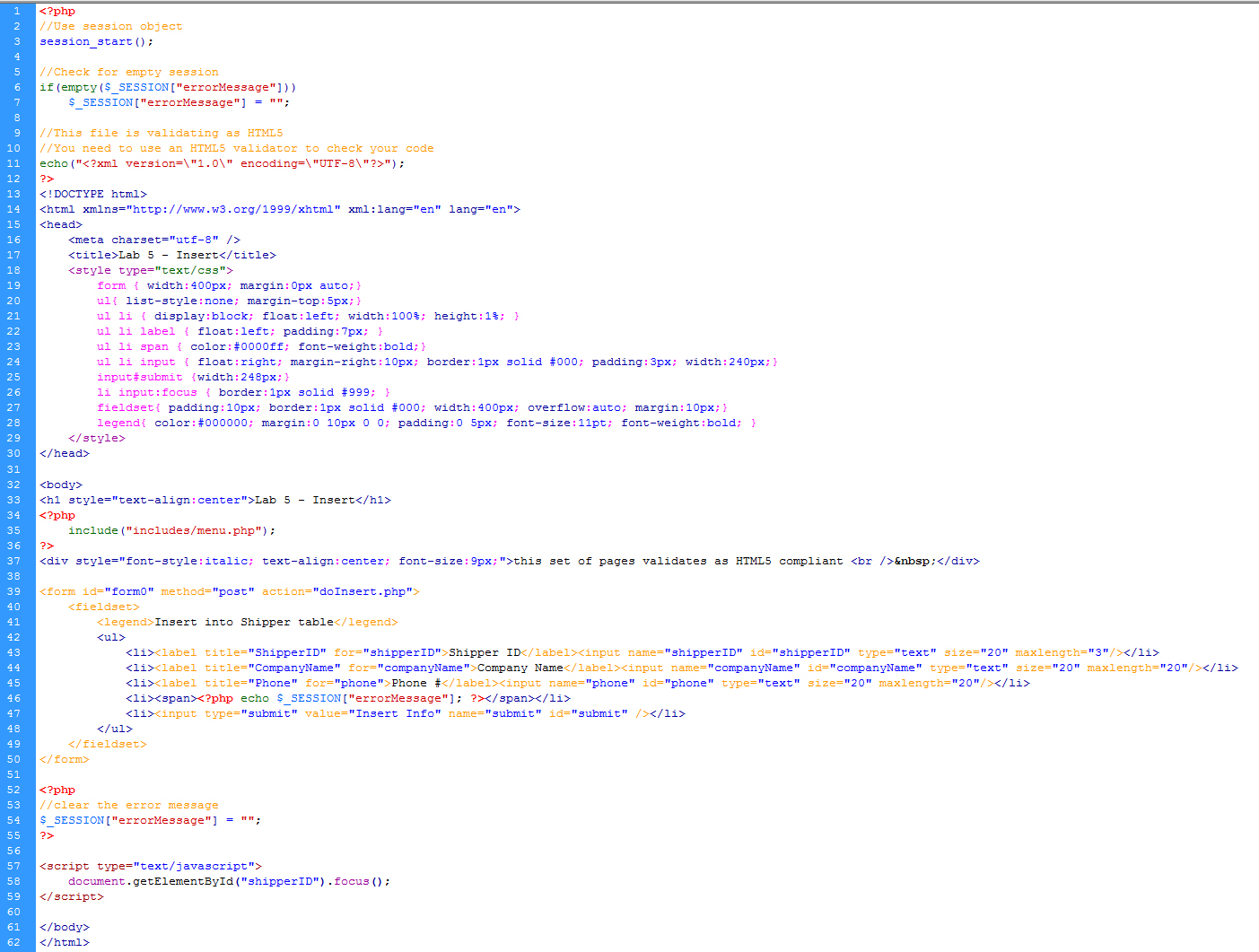
The insert page is a form that has 3 input boxes. These boxes will be used to gather
information on a new Shipper to add him/her to the Shippers table. When that form
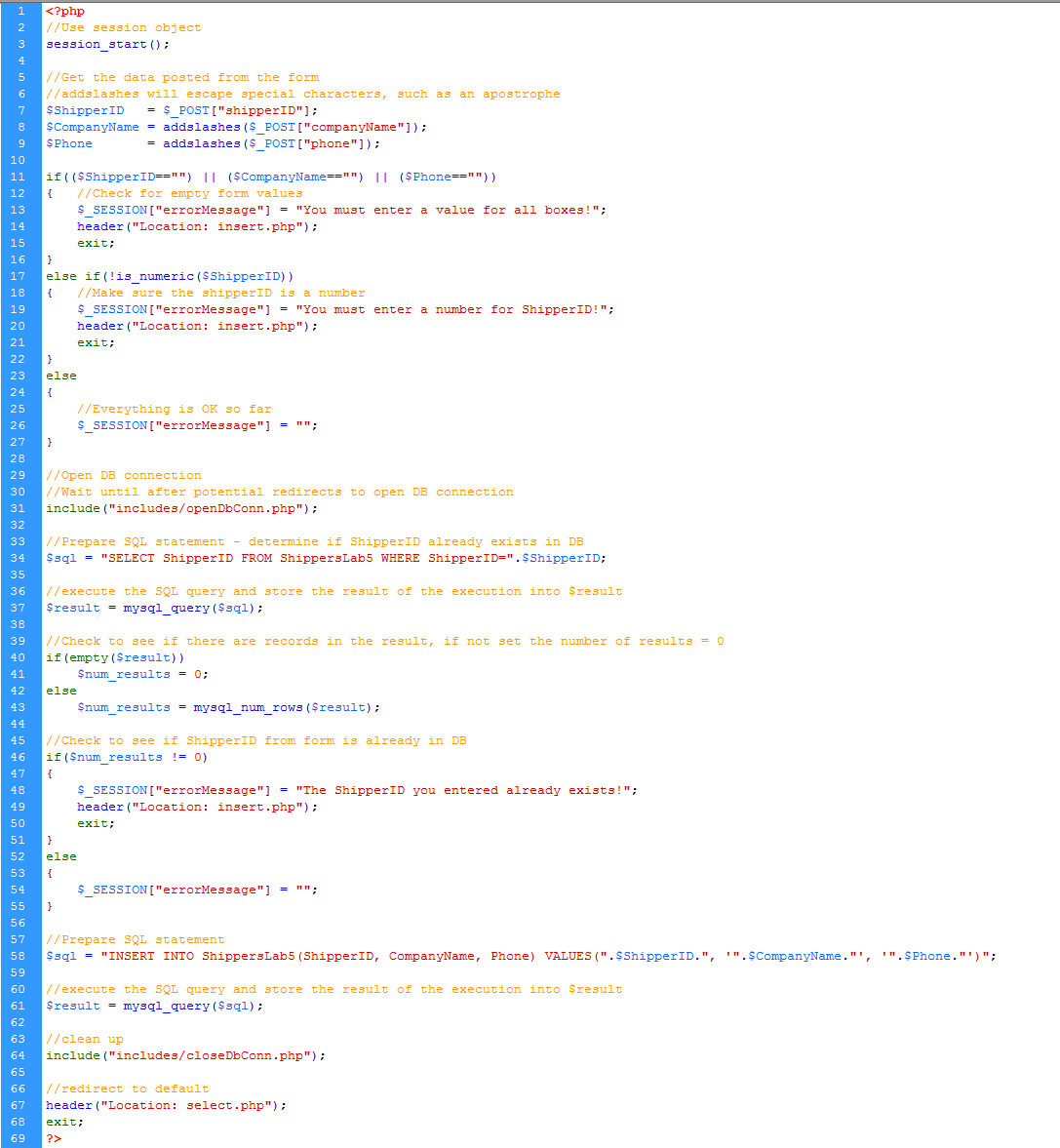
is submitted, it goes to the doInsert page. The doInsert page performs the insert and
redirects to the default page.
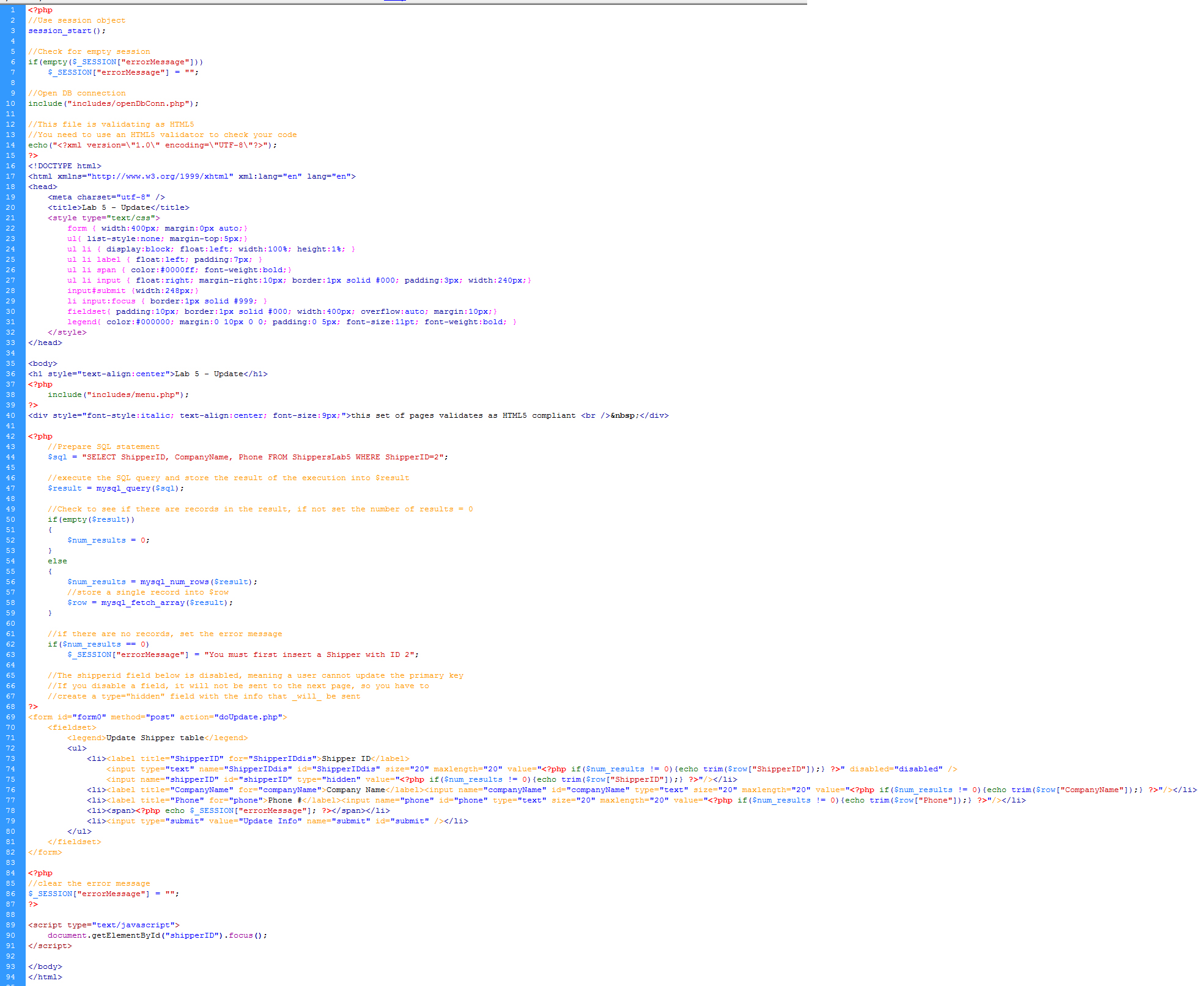
The update page is a form that autopopulates with the information from the Shipper
with ShipperID 2. Use the same form you used for the insert page. Copy and rename insert to update and then add the autopopulate functionality to the update page by pulling
that data from the database. When you change the information and submit it,
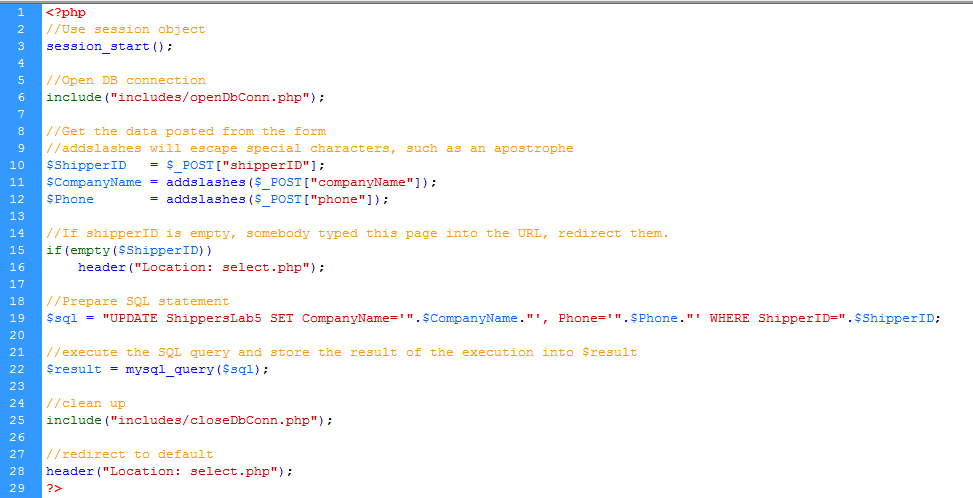
it goes to the doUpdate page. The doUpdate page performs the update and redirects to the default page.
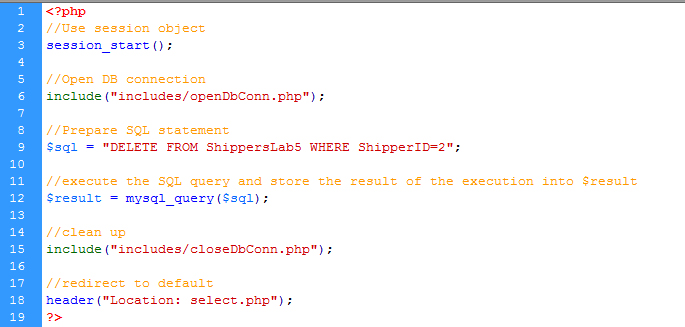
The delete page simply deletes the Shipper with the ShipperID 2. Delete that Shipper
without disturbing the rest of the information in the database. After the deletion
is completed, it redirects back to the default page.
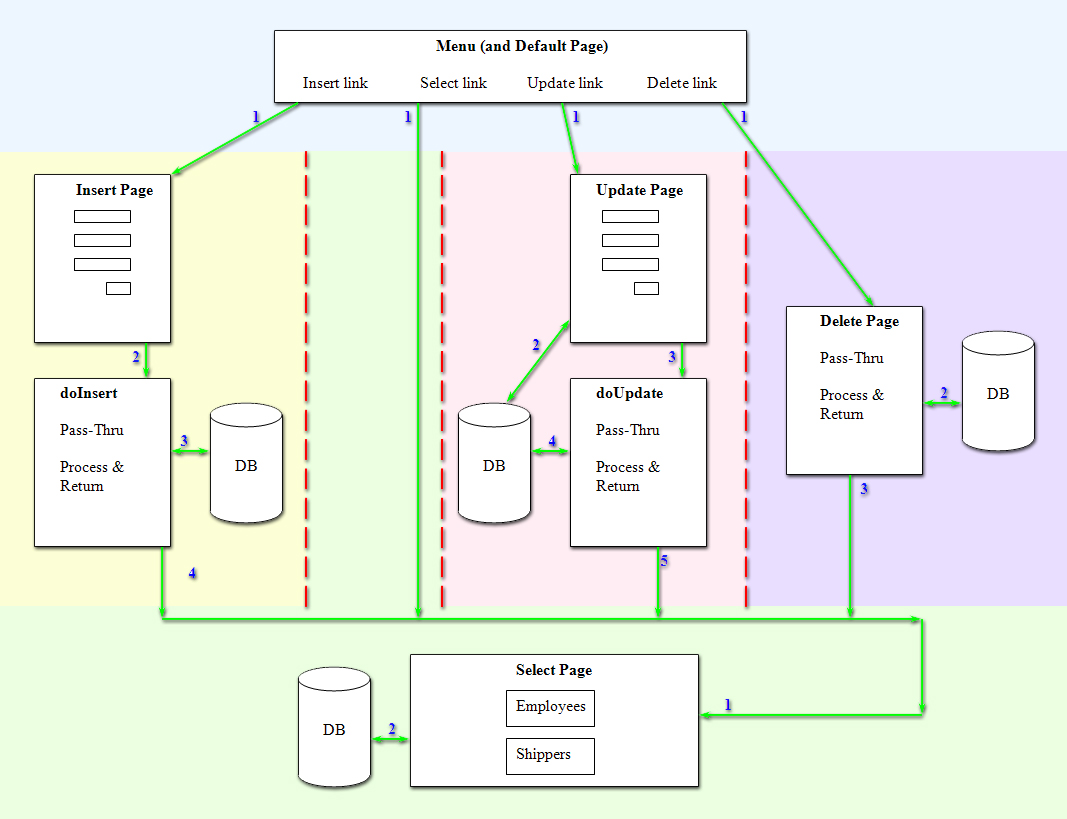
Below is a diagram depicting the flow of information (click to enlarge):
Materials to turn in on the server:
- In your Lab05 folder:
- index.php
- select.php
- insert.php [download here]
- doInsert.php
- update.php
- doUpdate.php
- delete.php
- "includes" folder
- openDbConn.php
- closeDbConn.php
- menu.php
- View this example finished solution
- Download the NorthWind tables for this exercise: SQL for creating database tables
- Log onto MySQL using PhpMyAdmin
- In the list of databases, choose your database (cgt356webNL)
- Choose the SQL tab
- Copy/Paste this SQL script
- Click the button/link to execute the query
- You are done with this script
- Use this script if you want to completely drop the tables and start over
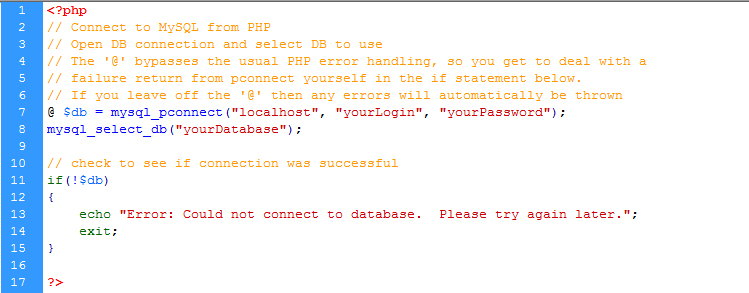
- openDbConn.php
- Entirely PHP
- Open the connection to the database
- Check to make sure the connection was successful
- Resides in the includes folder
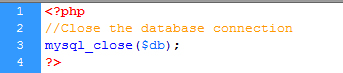
- closeDbConn.php
- Entirely PHP
- Close the database connection
- Resides in the includes folder
- menu.php
- Entirely HTML
- Only contains a paragraph tag, which contains the 4 links - no other html or code
- Resides in the includes folder
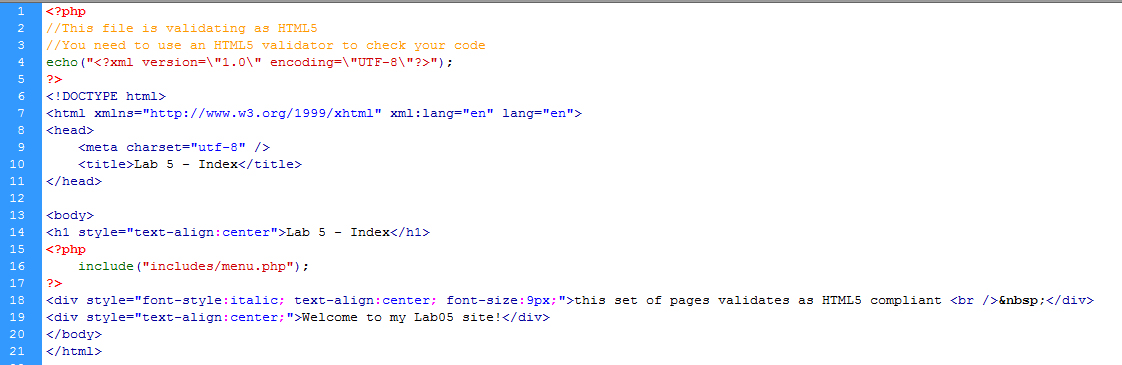
- index page
- Simple HTML page
- Include menu
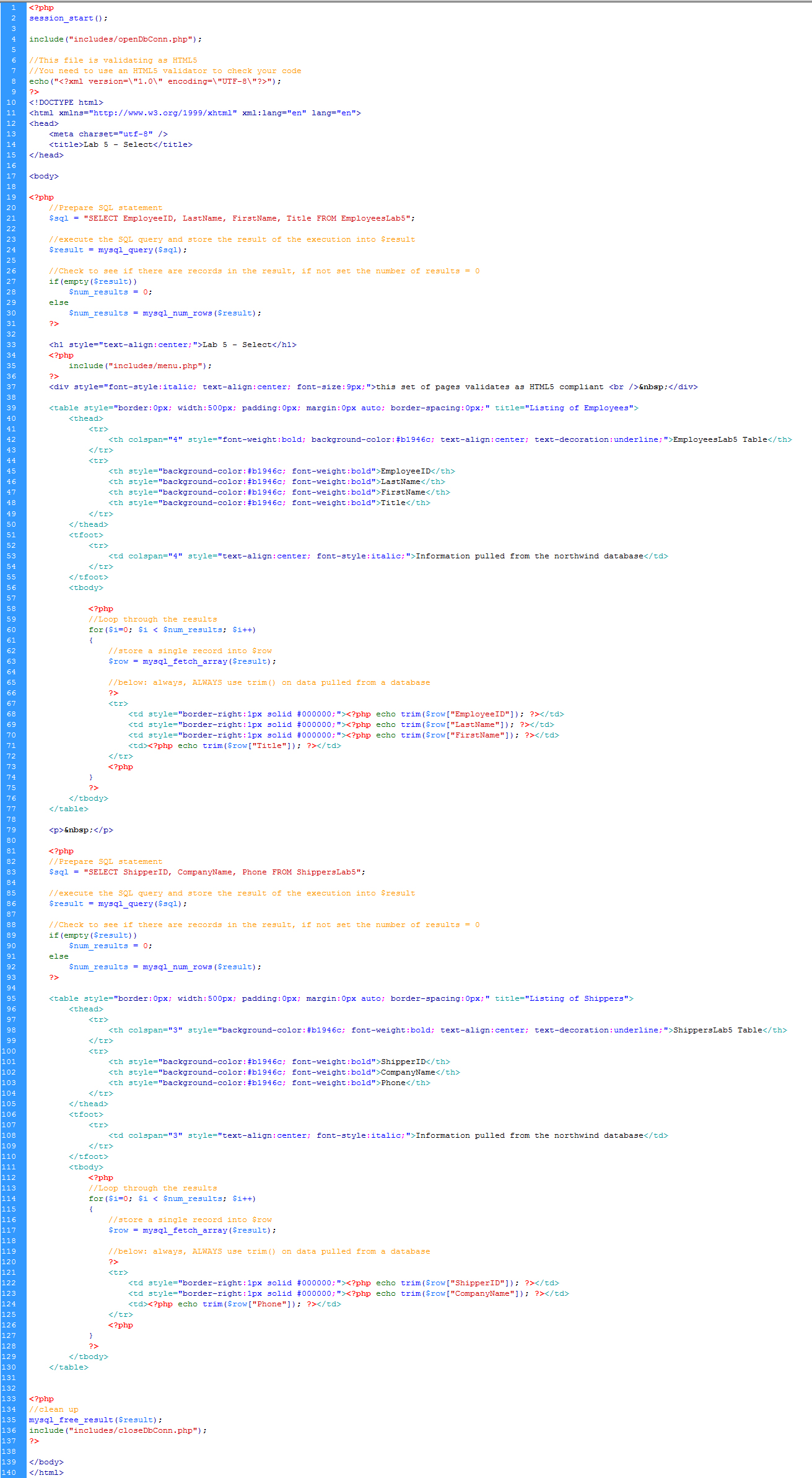
- select page
- Include openDbConn
- Include menu
- First, uses the SELECT statement to list the EmployeeID, LastName, FirstName,
and Title of all the employees in the database.
- Order the RecordSet data in a table format.
- The table should have header names to tell you which field is the EmployeeID,
etc...
- Second, create a second SELECT statement to list the ShipperID, CompanyName, and Phone of all the Shippers in the database.
- Order the RecordSet data in a table format (a different table from above).
- The table should have header names to tell you which field is the ShipperID, etc...
- **Your choice: you can either reuse the SQL and RecordSet variables or create new variables for the second table.
- Provide a link back to the default page
- Include closeDbConn
- Make the page aesthetically pleasing
- insert page [download here]
- Include menu
- Create a form with 3 input boxes for the ShippersLab5 table.
- One box for ShipperID (integer - look at CREATE statements in the SQL)
- One box for CompanyName (varchar[text] - look at CREATE statements in the SQL)
- One box for Phone (varchar[text] - look at CREATE statements in the SQL)
- Input elements should have at least: name, id, type, size, maxlength
- Use label elements appropriately with form elements (for accessibility)
- Use JavaScript to set the focus to the ShipperID text field
- When the form is submitted, the form data gets sent to the doInsert page
- **ShipperID must be an integer - If you enter anything other than an integer, your doInsert page will crash.
- Write out the error message from doInsert, if there is one
- Make the page aesthetically pleasing
- doInsert page
- Pass-Through page. i.e.: No HTML
- Include openDbConn
- Retrieves the information in the post from the insert page
- Stores that information in local / declared variables
- Concatenates the variables into the INSERT string of text
- Inserts the data into the database
- **Check to see if the form fields are empty, if so, set a session variable with an error message
- **Check to see if the ShipperID from the form already exists in the database (you'll need to do a SELECT first, then the INSERT). If it does, set a session variable with an error message
- Note: If you try to INSERT a Primary Key (in this case, ShipperID) that already exists in the DB, then your page will crash.
- Include closeDbConn before redirecting
- If there are errors, redirect back to the insert page
- After inserting, redirect to the select page
- update page
- Copy and rename insert to update
- Include menu
- Include openDbConn
- Input elements should have at least: name, id, type, size, maxlength
- Use label elements appropriately with form elements (for accessibility)
- Use JavaScript to set the focus to the CompanyName text field
- Add autopopulation to the page
- Only worry about the Shipper with ShipperID 2
- **Check to see if the RecordSet is empty or at EOF before you try to autopopulate the form fields. If ShipperID 2 was deleted, then it doesn't exist in the DB, which means this page will crash if you don't perform a check to see if the RecordSet contains that row of data.
- Page should display ShipperID but NOT allow it to be updated because ShipperID
is the Primary Key.
- Use the disabled keyword in the first input
field and send the actual ShipperID in a hidden field:
<input type="text" value="<?php if($num_results != 0){echo trim($row["ShipperID"]);} ?>" disabled>
<input type="hidden" name="shipperID" value="<?php if($num_results != 0){echo trim($row["ShipperID"]);} ?>">
- When the form is submitted, the form data gets sent to the doUpdate page
- Include closeDbConn
- Aesthetics will probably be exactly like the insert page
- doUpdate page
- Pass-Through page. i.e.: No HTML
- Include openDbConn
- Retrieves the information in the post from the update page
- Stores that information in dimensioned/declared variables
- Concatenates the variables into the UPDATE string of text
- Updates the data in the database
- Include closeDbConn before redirecting
- Redirects to the select page
- delete page
- Pass-Through page. i.e.: No HTML
- Include openDbConn
- Write the SQL query to delete the Shipper with ShipperID 2 from the ShippersLab5
table.
- Perform the delete on the database.
- Include closeDbConn before redirecting
- Redirect to the select page
- Code
- Here is the code for this entire exercise. Proper use would be: look at the code to make sure you are approaching the assignment the correct way. Then try to do it on your own. Then use the code to make sure you've done it correctly. Improper use would be: copying without interpreting, which would result in not really learning what you're doing. The code is provided to help you be successful and so that you don't have to ask as many questions about the assignment.
- Make sure it works on the server!!!
- Save a backup copy to your personal drive space.
- Do not modify any files after the deadline. Timestamps on all files will be checked during grading.
Grading
| Lab 5 Prelab |
-7 pts max |
| Coding & Comments |
-12 pts max |
| Aesthetics |
-4 pts max |
| Validate / Accessibility |
-4 pts max |
| Total |
27 pts possible |

|