<%@LANGUAGE="VBSCRIPT" %> <% Response.CacheControl = "no-cache" %>
Project #1 (Account Management System)

Scenario

You have been hired by G! to produce a secure web based account management site.  G! is a medium sized company that specializes in widgets n thingies and wants to offer novelty items with their logo for employees to buy online.  They have contracted somebody else for building the database and listing items on their site. They have hired you to create the account management portion of the site where users login to the system and enter and maintain their information such as names, passwords, shipping information, billing information, credit card information, and preferences. They have been receiving a high volume of calls from customers who want to purchase company gear with logos. This is not a service that the company currently offers, therefore G! wants to conduct a feasibility test of this concept.  The company wants to know if this would be profitable for them on a large scale. You have been hired to create a fully functional prototype of the account management system that would allow G! to test their idea.

Above & Beyond

These below items are negotiable items and considered to be extra items that could be used to demonstrate your excellence on this project above that of the Required Features below.

  • Add form validation using either PHP (server-side) validation or using elegant javascript (client-side) validation.
  • Use of jQuery

Example Working Projects

  • Example 1 - This is a really good example. It works well, is well designed, and has extra features. Start by creating your own account then login to use the site.
  • Example 2 - This is a good example. It works well, is well designed, and has extra features. Start by creating your own account then login to use the site.
  • Example 3 - This is _an_ example. It is not a great example. It does work and perform the basics. Start by creating your own account then login to use the site.

Required Features

  • Starting point
    • Your starting point must be named index (i.e.: index.php).
    • In other words, the following URL _must_ work (or points will be deducted):
    • http://cgtweb2.tech.purdue.edu/356/<yourFolder>/Project1/
    • Folders you will have in your server space (each containing an index.php):
      • <yourfolder>/Project1 
  • Use a small scale database for MySQL, provided by a third party through G!.
    • Download the SQL script here: project1.sql [right-click - save target as...]
      • Load PhpMyAdmin, connect to your DB, load this script, and execute the script.
    • Get the connection string information for the database here
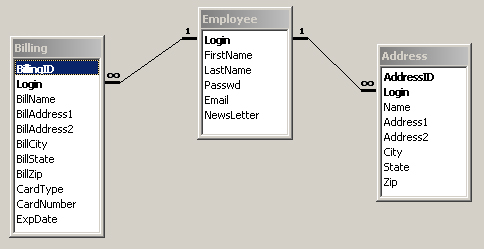
    • View the Entity Relationship Diagram here. This is a visual representation of the database.
    • Use the database as is. Do not make any changes to the database structure.
  • Suggested menu (depends somewhat how you setup your project):
    • Shipping, Billing, Account Info, Readme
  • Account Login
    • Login verification against the database
    • Redirect based on good/bad login
    • Provide a login/pass for me to grade with: login: ron pass: php
    • If users do not have a login
      • Page to create a new login and password
      • New login cannot be the same as an existing login in the database. You must properly handle duplicate usernames (ask them to change it).
  • Verification Pages
    • When any data is updated or inserted into the database, the user must receive some verification that it was successful.
    • This means that your page should have a check to see if it was successful.
    • Try doing this without introducing even more pages into the site.
  • Update Contact Info
    • Page(s) to update the user's name, password, and communication preference (whether to receive email newsletter from G!).
  • Site Personalization
    • Welcomes the user using his/her name pulled from the database upon login.
    • Option to logout if the user is not that person.
  • Logout
    • Option to logout on every page.
    • Session information cleared on logout (or on redirection to an error page).
    • Session abandoned - leave no trace of information that could be used for hacking.
  • Shipping Addresses
    • Users can enter as many mailing addresses as they want to.
    • These are shipping addresses where products will be sent to after purchase.
    • A page that lists all of the mailing addresses in an effective manner.
      • Ability to Change/Update any address
      • Ability to Delete any address
      • Ability to Add new addresses
      • (and pages that support all of these options)
  • Payment Options
    • Page to list billing addresses accompanied by credit card info
    • Similar to the Address Book (but this one is for payment information, not shipping)
    • Same ability to Change/Update, Delete, Add new addresses
    • In addition, with each entry, there is credit card information stored.
      • List page does not display entire card number (****1234 format)
      • Verifies correct number of digits in the card number when adding a new one
      • Card type
      • Card expiration date
      • Correct name on card
      • (all of this contained in one form insert with the billing address)
  • Security
    • Test your pages.
    • No unauthorized users should be allowed to view another person's information.
    • A user can only see his/her own information.
    • Outside users cannot get to this information by bypassing the login page.
  • Functionality
    • Try entering an apostrophe ( ' ) into every place your form will allow it and submit it...
    • Try entering textual data where numerical data is expected...
    • Try not following the format specified for a phone number, email address, etc...
    • Try, Try again...
  • Readme.php (same design as your site)
    • Include a Readme file in your project - include it in your main navigation.
    • Name & Course
    • Extras (above and beyond) if any
    • Explanation of any 'quirks' in your system
       
  • Do not modify any files after the deadline. Timestamps on all files will be checked during grading.
     
    CSS
     
  • The entire site must use CSS to format the pages. Inline, Internal, and External CSS are all acceptable. I suggest using an external CSS to make things easy on yourself.
     
  • Do not use a flat table approach.
     

This site will take a minimum of 15-20 PHP's to complete. You will find that, when done correctly, this site cannot be done in any fewer pages.

Processing pages should be separate from visible pages. Pages that do the processing (insert, update, delete, etc.) will be 'pass-through' (or 'process') pages. This is for added security. The user will never know the name of the PHP that does the processing, never see it in the browser, hence, the site becomes harder to hack.

Code must be commented well. Our 'rule' is one line of comment for every one line of code. Follow this as we have discussed in class. No commenting or an obvious exclusion of comments will result in your project grade starting from 70%. Uncommented code is hard to read, and your client is not a mind reader.

Deliverables

Students should be prepared to conduct an in-class critique/ peer evaluation of their projects. As such, students should submit their files to their share space on the web server so that it is readily accessible.

You are to deliver the following copies of the project:

  1. One finished copy in your share space on the server. Do not modify the files after the due date/time. We will check the timestamp. Your Project1 folder will contain the checkpoint folders listed above with all associated files. You should also provide resources, that is a description of any materials that were not created by the student along with the location of where said materials were acquired (URLs, stock CD's, etc.)

Grading Criteria

If the project is not functional (does not work), then your project grade starts at 50%. This is a professional project; our company will not accept partial work. Late work will not be accepted. (In the real world, you would not get paid for a project you did not complete. In our world, you start at 50%)

  • 35% Aesthetics & Usability
    • (Professional, effective navigation, common scheme across entire site, use of images, originality, creativity, usability features, intuitive, user friendly, easy to use, etc.)
    • 5% goes toward first checkpoint
       
  • 45% Coding
    • (Proper indentation, neatness, free from errors, correct logic, security, follows typical coding standards, apparent planning, etc.)
    • 10% goes toward second and third checkpoints
       
  • 15% SQL
    • (Properly formed queries, selection of minimal data sets, proper selects, deletes, updates, inserts, data trimmed appropriately, etc.)
       
  • 5% Commenting
     
Total Possible Points: 100

CGT 356 - Glotzbach
Copyright © 2002-<%= Year(now) %> Ronald J. Glotzbach, Purdue University, All rights reserved.